Showing posts with label blogger. Show all posts

Friday, 5 December 2014

reading your twitter feed (pt2)...

...can reveal information about others' blog credentials.

If you're the curator/editor/researcher/photographer of an important art institution's blog feed, it's a BIG deal.

Jacob Horn - Editorial Assistant at New York's Whitney Museum is taking over the museum's Instagram account.....

He specialises in:

"Writing and editing, research experience, technical literacy, communication, social media, museums and cultural institutions" 
- from LinkedIn

Whitney Museum on Instagram
Instagram
Instagram
Instagram
see also: part 1 of read your twitter feed

Saturday, 18 October 2014

good bios

personable...

Sandra Dieckmann

"Sandra is an artist & womanimal. 
 She was born in Germany, works and lives in London and will go elsewhere."

on Facebook, Instagram, Tumblr
Sandra Dieckmann
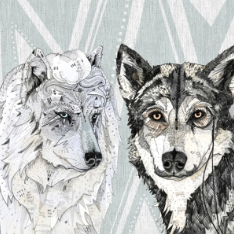
Wolf-gang

to-the-point...

Drawings and Notes

"A weblog about drawings, scribbles, notes and an occasional painting or photograph."

on Twitter, Blogger and Tumblr

Drawings and Notes blog
Artist - Alexi K

"I do not work for free. Neither should any artist, but there are always exceptions on a project, so I maintain an open mind and consider each project individually.

I prefer a reasonable up-front fee for a consultation and / or sketches. My time is as important as anybody's, and that's what you are paying for." 


on Blogger, Twitter, Wordpress


Monday, 6 October 2014

what is trolling?

Online trolling is the posting of offensive, upsetting and inflammatory comments  on social media (e.g. Facebook) and micro-blogging sites. Anyone who does it is called a troll.

The term can also be applied to those who post rude and inappropriate opinions and comments on blogs.

The aim of the troll is to post things where they can be seen publicly, and where they can illicit a reaction.

It is important to consider how you might deal with this if it happens to you.

Should visitors to your blog say whatever they want? after all - it's a public space.

The answer is no. 
You don't have to accept any of the above bad, online behaviour.

Remove comments if you want to.
--------

link ---> How to remove comments on Blogger

-------


What to do if someone trolls you on Twitter

Click on the cog symbol

- top right of your Twitter page 

A drop down menu appears...

Click on settings...


 You'll see this menu in the left hand column of the page...

 Click on 'Help'...

You'll find yourself on Twitter's 'Help Center' page.
Look for this box....
Clicking on 'Online abuse' will give you lots of information about what to do, and how to report abusive content to Twitter.

Wednesday, 24 September 2014

Tuesday, 23 September 2014

finding things again

If you want to find things on your own blog - or want others to find things on it - get in to the habit of using the label system each time you post.

When you click on "New Post" - located top right on your Blogger page, you are sent to a page with a large text box for composing your post. 

You might also access it through your blogger dashboard

You'll see this in the right hand column.... 


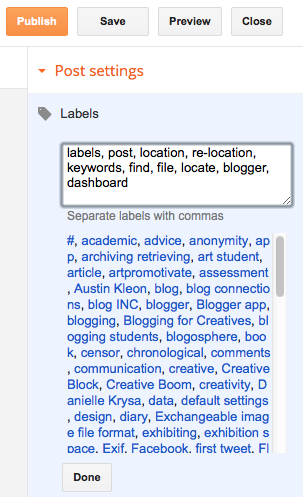
Click on 'Labels' ....
You can see some examples of previous 'labels' already used for this blog.

Use the box to add key words for your post or article. 

Useful labels for this post might be:

'labels, post, location, re-location, keywords, find, file, locate, blogger, dashboard'.

Make sure you separate each word or phrase with a comma.


Click on 'Done'.


You can always add more by clicking on 'Labels' again

Using labels each time you prepare a post is a good habit to acquire.

When you've completed, and published your post, your labels will be listed below it....


Clicking any of the labels on your published page will take you to your blog pages containing corresponding labels or keywords

Note: on Wordpress labels are known as tags 

Sunday, 31 August 2014

blogging privacy: iPhone settings

Privacy settings on an iPhone can be set to ensure your blog says only what you want it to say.

Try not to inadvertently give information away about yourself - especially location/GPS information.

You may need to change some of the settings on your iPhone.

The following information assumes use of the Blogger app + iPhone

Go to 'Settings' on your iPhone (on your 'Home' screen)
Scroll down to 'Privacy'


Click on 'Privacy', and then 'Location Services'


If you've successfully uploaded the Blogger app to your iPhone you should see it listed here. Slide 'Location Services' to off 


Saturday, 30 August 2014

blogging privacy: tablet / smartphone settings

Your blog should be about your subject....not about you, or where you live, where you attend college, or where you blog from - unless you decide an autobiographical and/or location based approach is your blog's focus.

Consider the privacy settings on your tablet. 
If you're going to use your smartphone for blogging too - the same advice is true. 

The app you choose to blog with will probably be the same for both your tablet and phone. 

The Blogger app used here is just one of several you might choose to make your own blog.

Note: This article is based on Blogger and iPad use

download Blogger app here

Your privacy settings determine how much you share with your readers...and with Google.
If you don't consider your privacy settings, you may share more information than you meant to, or want to.

As a rule of thumb give as little away about yourself as possible. You can always change the settings later if you need to - and when you know more about what you're doing.

Go to 'Settings' on your iPad
Click on 'Privacy', and then 'Location Services'


Any of your apps that use Location Services should be listed here.

In the following example Blogger is switched off (as are most of the other apps too).


As you begin to use the app you may get a prompt screen like this:


 If 'Current Location' is successfully switched off and you accidentally hit 'OK'
your next screen should say:


See privacy settings for iPhone information here