Monday, 29 September 2014

multiple accounts

The chances are that you're already using all or some of the following: Instagram, TwitterTumblr, Pinterest or Facebook


What are you using them for? i.e. what kind of blogger are you?

If you've set them up already it makes sense to carry on using them - right?

Not necessarily.

If your blog is for professional / academic purposes it needs to reflect that fact.
Drunken nights out, silly pictures of you and your friends....or the cat, just won't do. Even if images and embarrassing statements are buried way back on your timeline (the running order of your blog from the most recent post to previous posts found by scrolling down) - others will find them. 

However, if you're already using these blogging platforms, enjoy them, and are probably proficient at using them....

....why not open another account using the same platform?

Start your blog afresh - and only put relevant information on it.


Sunday, 28 September 2014

conclusions on blogging from an iPhone....

...using the Blogger app see previous post - seems to result in:
  • the text font automatically changing to courier* - though this doesn't seem consistent - it changes after the insertion of an image 
  • the image defaults to the left hand side of the column
  • subsequent text to image wraps the image rather than sitting beneath it

Why are these differences important?

They might not be....

....unless you want your blog to look consistent....and visually attractive.

plus:
swapping between font, and text styles can make reading your blog difficult to do.

May be the trick is to blog from your mobile device and edit your post later.


*Verdana is the font used for this blog

Friday, 26 September 2014

blogging from an iPhone

OK, so I've not tried blogging from my mobile phone yet. Time to try it - using the Blogger app I've downloaded. 

Can't say I'm a fan of the scale (the app seems fine). Everything feels a bit cramped. Such a tiny tiny screen after completing all other blog posts on my desktop computer. 
Perhaps I need to revise my thinking as to what, when and why to blog from my phone. 

Thursday, 25 September 2014

tumbling

A tumblelog sits somewhere between a microblog like Twitter... and a blog - such as this.

Like Twitter it supports short content, but unlike Twitter it is designed for easy upload of other media content too. These include video, audio, quotations, links, images (also possible on Twitter), and 'chat'.


The word tumble log has become synonymous with Tumblr because of its clever appropriation of the term tumblelog into the site / social network's name.

previous tumblr post here


Wednesday, 24 September 2014

Tuesday, 23 September 2014

finding things again

If you want to find things on your own blog - or want others to find things on it - get in to the habit of using the label system each time you post.

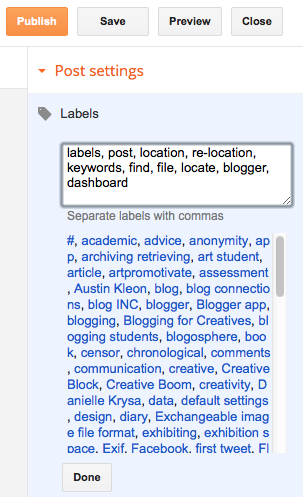
When you click on "New Post" - located top right on your Blogger page, you are sent to a page with a large text box for composing your post. 

You might also access it through your blogger dashboard

You'll see this in the right hand column.... 


Click on 'Labels' ....
You can see some examples of previous 'labels' already used for this blog.

Use the box to add key words for your post or article. 

Useful labels for this post might be:

'labels, post, location, re-location, keywords, find, file, locate, blogger, dashboard'.

Make sure you separate each word or phrase with a comma.


Click on 'Done'.


You can always add more by clicking on 'Labels' again

Using labels each time you prepare a post is a good habit to acquire.

When you've completed, and published your post, your labels will be listed below it....


Clicking any of the labels on your published page will take you to your blog pages containing corresponding labels or keywords

Note: on Wordpress labels are known as tags 

Monday, 22 September 2014

saving and sharing images

How often do you see a great image based website or online image and think - 'that's great I must make a note of it'......except you never quite get around to it?

There's no excuse not to save visuals - especially if they're relevant to what you're studying or researching.

Two easy-to-use blogs - for saving, storing, archiving, retrieving, showing and exhibiting your specialist, or eclectic visual collections - are Tumblr and Pinterest 


Tumblr


Pinterest